

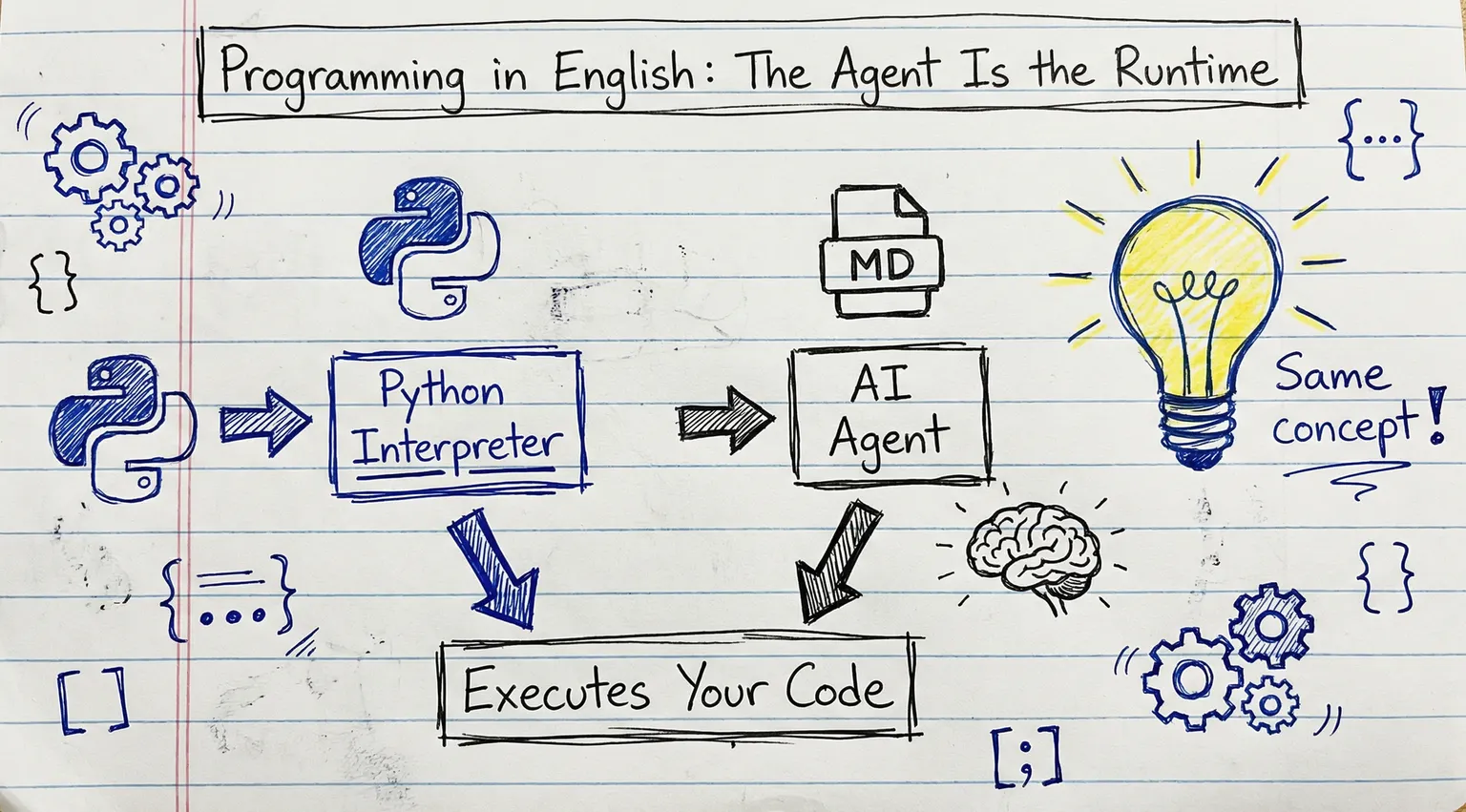
What if I told you I've been programming for the last year—handling complex workflows, processing massive-scale AI operations, shipping production systems—and the orchestration layer isn't traditional code—it's English, written as markdown?
The runtime is the AI. The programming language is English. The codebase is a folder of markdown files.
It sounds like a joke. It's not. And after a year of working this way—including writing this very sentence—the AI isn't just helping me work. Within the structures I've designed, it's executing the work.
The AI agent isn't a tool you're programming. It's the runtime your program runs on.
When you write Python, the Python interpreter executes your code. When you write markdown workflows, the AI agent executes your workflows. Different runtime, same concept—with one caveat: this runtime has judgment, which means outputs vary even with identical inputs. That's a feature when you want flexibility, and a risk when you need precision.
This changes everything about how you architect AI systems.
The Prompt Engineering Plateau
We've all been there.
You write a clever prompt. It works beautifully for your specific use case. You feel like a wizard. Then you try to extend it to a slightly different scenario, and it breaks. You patch it with more instructions. It gets fragile. You add examples. The context window fills up. You start over.
This is what I call the prompt engineering plateau—the local optimum of prompt tweaks that can no longer scale to complex, multi-step workflows. (If you're wondering how this relates to "context engineering" or "scaffolding"—I'll address the terminology later. Short version: related concepts, different emphasis.)
Here's a typical failure mode: your prompt works perfectly for one customer's data format, then silently produces garbage when another customer's data has slightly different field names. Or it handles the happy path beautifully, then skips critical validation steps when the context window truncates mid-instruction.
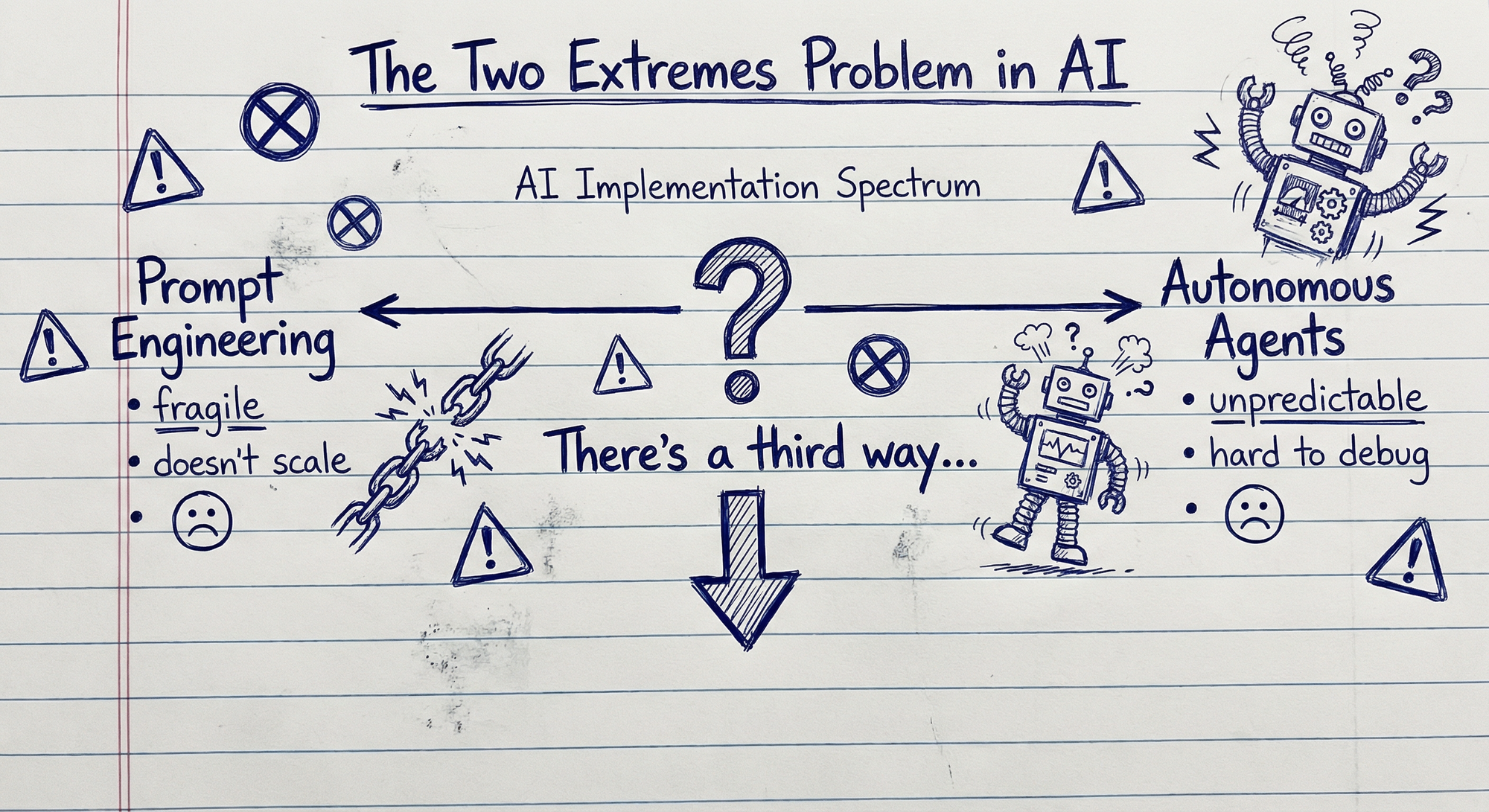
A dominant industry trend has been to swing toward the other extreme: autonomous agents. Give the AI tools and goals, add some guardrails, and let it figure out the path.
But here's the problem with autonomous agents in production: they're unpredictable. They hallucinate paths. They make expensive mistakes. They're nearly impossible to debug when something goes wrong. "The AI decided to do X" isn't an acceptable postmortem for production systems handling real business processes.
So we're stuck between two bad options:
| Approach | Promise | Reality |
|---|---|---|
| Prompt Engineering | Craft the perfect instruction | Doesn't scale, too fragile |
| Autonomous Agents | Let AI handle complexity | Too risky, hard to control |
There's a third way. And it starts with recognizing that the problem isn't the prompts or the agents—it's how we're thinking about the environment.
The Discovery
Here's something everyone who uses AI extensively has experienced.
You've been chatting for a while. You've explained your situation, loaded context, shared background. And suddenly the AI is nailing it. It understands your constraints, your preferences, your goals. It's doing excellent work.
That state is magic. It's also fragile.
It took time to build up. You can't easily replicate it in a new conversation. And eventually the context window fills up, the AI starts losing the thread, and quality degrades. You either start over or push through the deterioration.
What I discovered: you can capture that state and make it instantly replayable.
I created a file called EXECUTE.md with a routing table written in plain English. Now a fresh chat, empty context, brand new AI—point it at @EXECUTE.md and within seconds it rapidly reconstructs the relevant state. It traverses the structure, loads what it needs, understands the system. No warmup. No re-explaining. Instant expertise.
I started thinking of it as giving the AI instant context—a structured loading sequence that reconstructs the relevant state immediately. The pattern that emerged was always the same: entry point file + routable workflows + durable knowledge base.
The file wasn't documentation about a process. The file was the process. The AI reads it and knows how to operate. Intent maps to execution through structured language.
The Architecture
The pattern that emerged across every implementation was the same three components:
Entry Point — A single file where execution starts. It contains shared instructions that apply to every task (how to parse requests, how to behave, general principles) plus a routing table that maps intent to specific workflows. "I want to research this" → load the research workflow.
Workflows — Granular task files, loaded only when needed. Each contains step-by-step instructions for a specific task. The AI doesn't load all workflows—just the one relevant to the current intent. Token-efficient by design.
Knowledge Base — Static information referenced by both the entry point and individual workflows. The stuff the LLM doesn't have in its training, or needs refined for your specific context: product documentation, brand guidelines, tone of voice guides, technical specifications, regulatory requirements, historical decisions and why they were made. The AI reads your domain knowledge like a library.
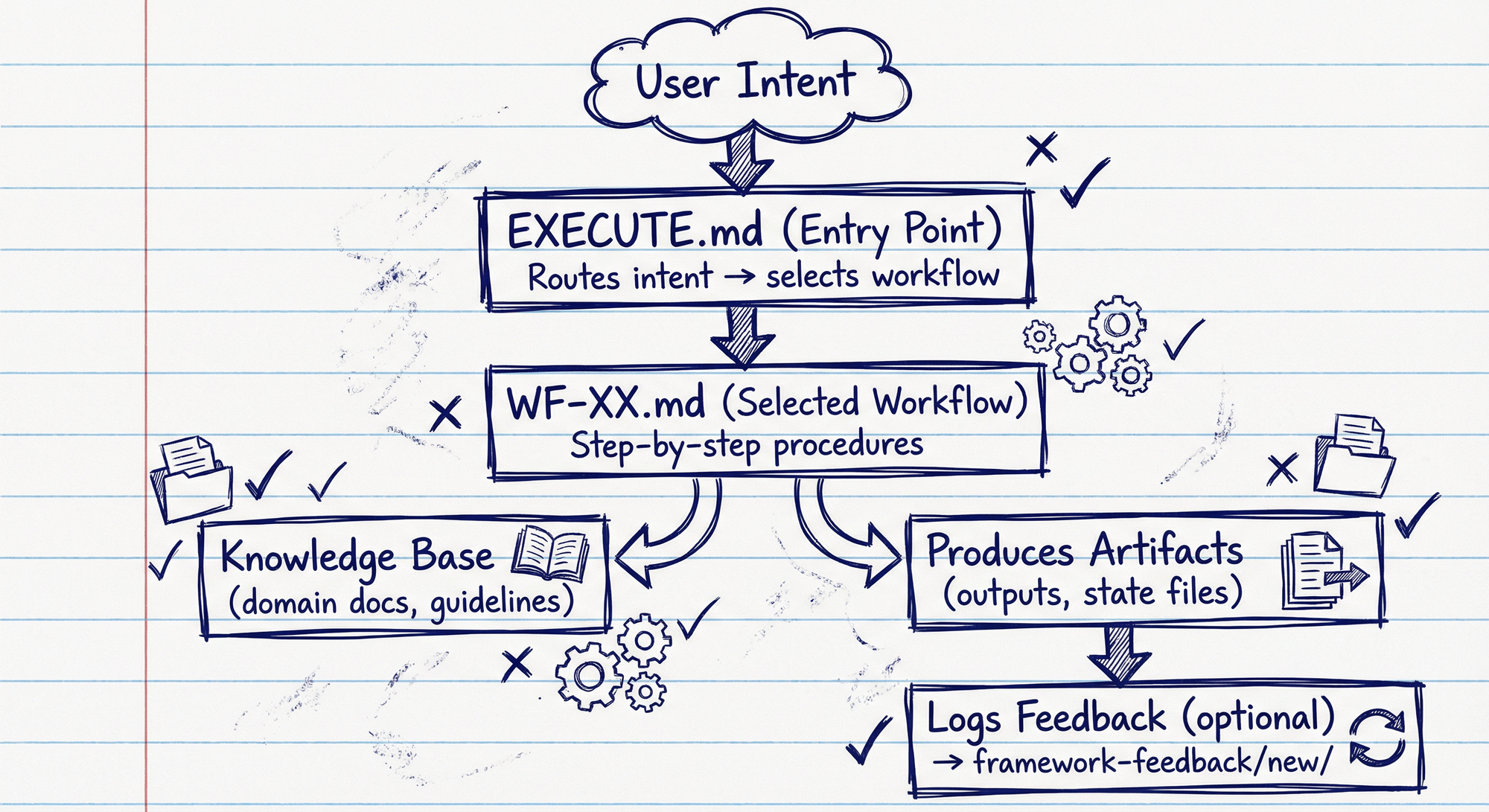
Entry point + workflows + knowledge base. That's it.
Here's what makes it interesting: the AI organically decides what to load into its context window based on the task it needs to perform. It reads the entry point, recognizes the intent, routes to the relevant workflow, pulls in knowledge as needed—making intelligent decisions about what context it requires. No Python scripts orchestrating this. The structure enables navigation, and the AI is intelligent about how to navigate it.
But here's the key distinction: the AI decides how to traverse the structure, but the structure defines what to do. The goals, the steps, the guardrails—those are designed by humans, encoded in the files. The AI isn't autonomously deciding what tasks to pursue. It's intelligently executing within an environment you've architected.
This wasn't prompt engineering—I wasn't optimizing individual instructions. And it wasn't fully autonomous agents—the AI wasn't setting its own goals. It was something else: architecting the environment that shapes AI behavior.
I started calling it Context Sculpting.
How It Works in Practice
Let me show you what this looks like in a real system.
I'll walk through the AI Content Studio—the framework I use for researching, drafting, and publishing content like this post. Not because you need to write blog posts, but because it demonstrates the core patterns in a system that's actually running. The same architectural principles apply whether you're building business intelligence reports, compliance documentation, customer support workflows, or something entirely different. The domain changes; the structure doesn't.
Natural Language Routing
At the root of the content framework sits EXECUTE.md—the entry point. It's a routing table written in plain English that maps intent to execution:
| User Request | Workflow |
|---|---|
| "Create new topic" | → WF-01-new-topic.md |
| "Research this topic" | → WF-03-research-synthesis.md |
| "Write first draft" | → WF-04-create-draft.md |
| "Improve this draft" | → WF-05-review-draft.md |
| "Generate hero image" | → WF-06-generate-image.md |
Here's how it works in practice. Say you have an idea: "I want to write about AI-assisted code review tools." You tell the AI to capture this as a new topic. It creates the folder structure and initializes the brief.
Now you say "Research this topic." The AI reads the routing table above, matches your intent to WF-03, loads that workflow file, and executes it. It's fuzzy matching plus instruction-following: the agent selects the closest route, then confirms via the workflow's "Use/Input/Output" header before proceeding. What's it actually doing? It's finding the latest tools and benchmarks, identifying what's already been written, discovering recent case studies and performance data, spotting gaps in existing coverage. The research answers: What's the current state? What's new? What unique angle can you take?
It's routing—just written as a markdown table. It's function dispatch—just implemented in natural language. Same concepts, different syntax.
Here's what the actual research workflow file looks like:
# WF-03: Execute Research Phase

Use: After deciding content angle, before drafting
Input: Completed brief.md with chosen angle
Output: Research materials in sources/, synthesized notes.md

## Steps

1. Read the topic brief to identify research needs
2. Execute web research (search, capture 5-10 key sources)
3. Run SEO analysis if applicable (keywords, content gaps)
4. Capture visual examples if needed (screenshots, references)
5. Synthesize findings into research/notes.md:
   - Key findings (3-5 main insights)
   - Unique angles missing from existing content
   - Supporting evidence (stats, quotes, examples)
   - Content recommendations
6. Update metadata status to "researched"
7. Report findings and suggest next workflow (WF-04: Draft)
The AI reads this file and executes each step. Structured natural language that the agent interprets as procedure.
Folder Structure as Control Flow
Here's what the structure looks like for any piece of content:
topics/active/context-sculpting-methodology/
├── brief.md                  # What we're creating and why
├── angles.md                 # Strategic angles explored
├── metadata.json             # Status, dates, target platform
├── research/
│   ├── notes.md             # Synthesized research findings
│   └── sources/             # Individual source documents
│       ├── 01-anthropic-context-engineering.md
│       ├── 02-mit-scaffolding-research.md
│       └── ...
└── drafts/
    ├── 01-initial-draft.md
    ├── 02-refined-draft.md
    └── 06-revised-draft.md   # ← You're reading this one
Every location encodes meaning:
topics/active/→ AI processes these, suggests next stepstopics/published/→ AI treats as read-only referencetopics/ideas/→ AI can pull inspiration but won't modify
Move a folder from active/ to published/ and the AI's behavior changes instantly. No configuration file. No status flags. Location is program logic. (This only works reliably if you enforce consistent naming conventions and keep folders clean—structure without discipline becomes noise.)
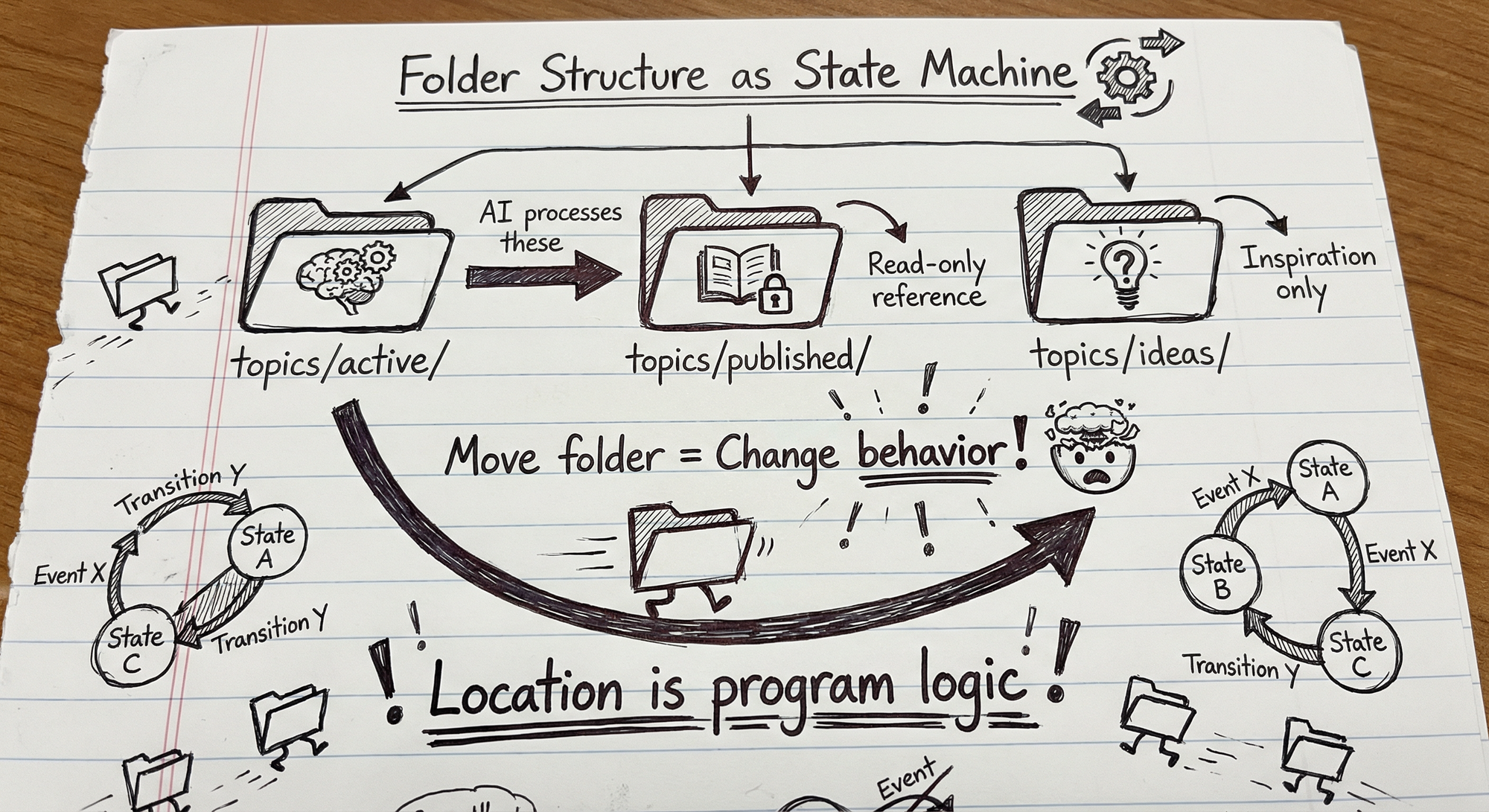
When you say "Continue working on the context sculpting post," the AI searches topics/active/ for the matching folder, loads brief.md to understand the goal, finds the latest draft, and picks up where we left off. It navigates this structure semantically, understanding that location determines lifecycle, which determines behavior.
The Self-Improvement Loop
Here's where it gets interesting—and where discipline matters most.
Built into every workflow is an explicit instruction: if you encounter something unclear, ambiguous, or that could be optimized, log it. The framework has a dedicated location: framework-feedback/new/. When the AI identifies an issue, it doesn't just work around it—it creates a markdown file documenting the problem and suggesting improvements.
Critical: the AI proposes, humans approve. Every suggested change goes through review before implementation. The feedback workflow generates diffs, not deployments. I review each proposal, test the change in isolation, and only then merge it into the active framework. Without this gate, you get compounding errors—the AI "improving" based on its own flawed improvements.
Quality guardrails that make this work:
- Feedback must include a concrete example or reproduction case
- Proposals that touch routing logic require manual testing
- Changes are versioned so you can roll back
- Periodic audits compare current behavior to baseline expectations
Real example: During a complex research task, the AI hit token limits and couldn't complete the synthesis. Instead of failing silently, it logged feedback: "Research workflow needs mid-task summarization checkpoint to handle large source sets." I reviewed the proposal, tested it on three different research tasks, then added the summarization step to WF-03. Now every research task includes a built-in checkpoint that prevents context overflow.
The AI identified the problem and proposed the solution. I validated and implemented it. The system gets smarter through supervised iteration, not autonomous mutation.
Two Execution Modes
The same framework operates in two modes:
Interactive: Using Cursor or Claude, you work alongside the AI. You reference @EXECUTE.md, the AI loads what it needs, and you iterate together. This is how I'm writing this post—conversational, collaborative, refining through multiple passes.
Automated: The same framework runs headlessly via CLI. Commands like claude --print "@EXECUTE.md Generate weekly report" execute the same workflows unattended. Scheduled via cron, triggered by events, or called as a service.
Same entry point. Same workflows. Same knowledge base. The only difference is whether a human is steering or the system is running autonomously within your guardrails.
This is what makes it production-ready: the framework works whether you're sitting at your desk or it's 3 AM and a scheduled job is running.
When Automated Execution Fails
Running workflows at 3 AM is powerful. Running broken workflows at 3 AM is expensive. Here's how to make automated execution reliable:
Routing validation: Before headless execution, the entry point confirms it matched the right workflow and logs the match. If confidence is low or ambiguous, it fails loudly rather than guessing.
Checkpoint outputs: Workflows write intermediate state to predictable locations. If a run fails mid-execution, you can see exactly where it stopped and what it produced.
Structured error logging: When something goes wrong, the error log includes: what workflow was running, what step failed, what the input was, and what the AI was attempting. "Task failed" isn't debuggable; "WF-03 step 4 failed: could not parse source document, expected markdown headers" is.
Canary runs: For critical workflows, run a test case before the production batch. If the canary fails, the batch doesn't start.
Human-in-the-loop fallback: Some failures shouldn't be auto-retried. The workflow can be configured to pause and notify rather than attempt recovery, especially for irreversible operations.
Automation doesn't mean unattended. It means the system runs without you while keeping you informed.
The Universal Pattern
Notice what stays the same across every domain:
The Architecture:
- One entry point routing intent to workflows (markdown table)
- Folder structure encoding lifecycle and state (location = meaning)
- Workflows as natural language procedures (readable by humans and AI)
- Feedback loops enabling self-improvement (the system evolves)
- Dual execution modes (interactive collaboration or automated)
What Changes:
Content production has topics/active/ and research workflows. Business intelligence has reports/active/ and data pipelines. Compliance has applications/in-progress/ and generation workflows.
The folder names change. The workflow details change. The knowledge base content changes.
The architecture doesn't.
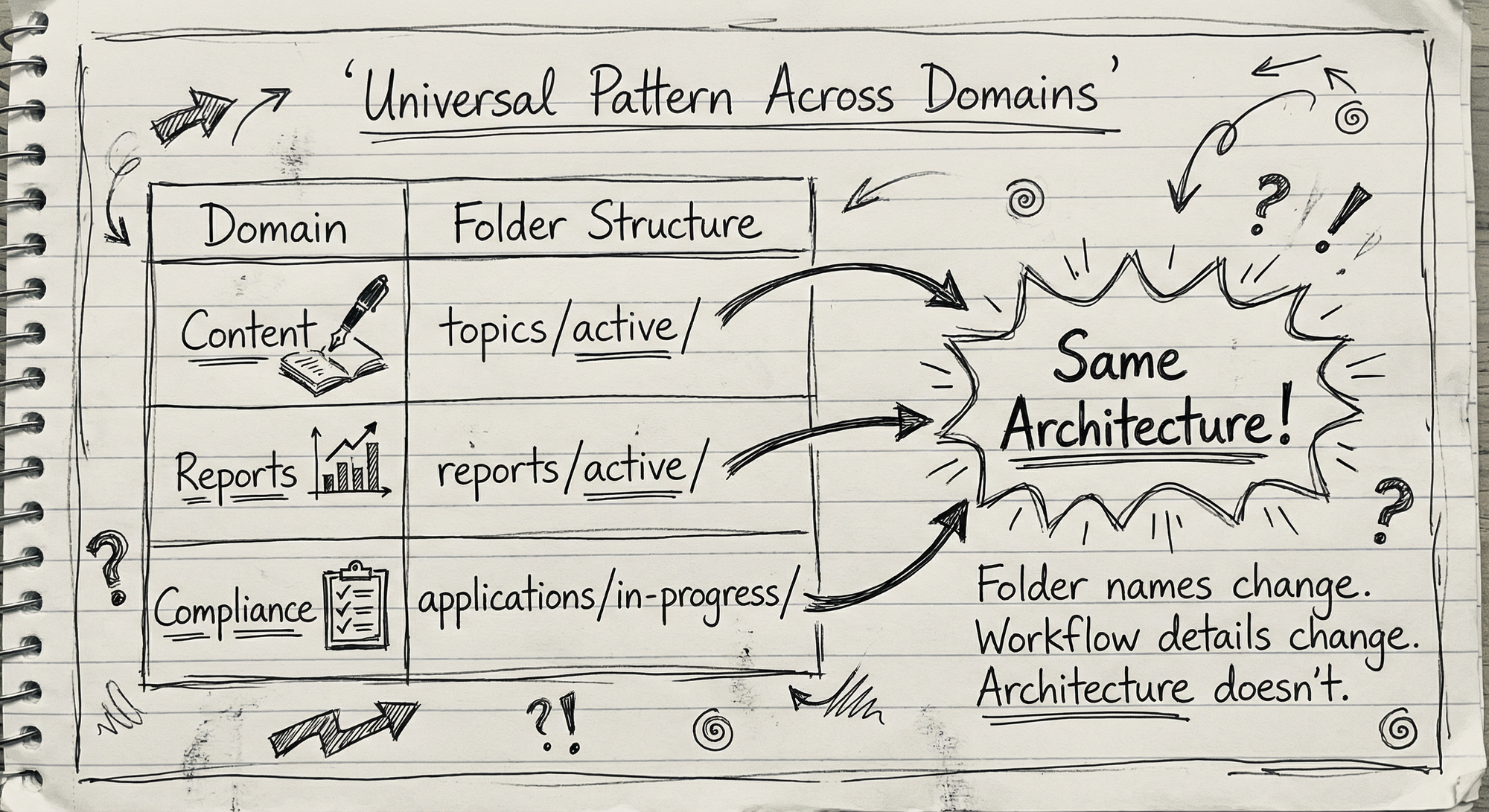
You're not adopting a content production system. You're applying an architectural pattern that works across domains. Infrastructure as Code is to infrastructure as Context Sculpting is to AI behavior—the same principles apply whether you're deploying to AWS, Azure, or GCP, and whether you're building content workflows, business intelligence, compliance documentation, or something entirely different.
Real-World Evidence
This isn't theory. I've been building on this approach for over a year, across multiple production systems. Here's where it's running:
Content Production — The framework that wrote this post. Enables rapid development of sophisticated market communication—exploring ideas, developing posts, splitting into series, reviewing feedback, creating graphical assets. From concept to published draft: days, not weeks.
Business Intelligence — Reports that think. The AI doesn't fill in a template—it reads the data, identifies what matters, and writes accordingly. Reports dynamically adapt to what's actually in the data, within structured boundaries. Revolutionary for maintaining consistency while allowing organic analysis.
Compliance Documentation — ICANN applications to operate new domain extensions. $300,000 filing fee. 300+ pages across 50+ sections. The kind of work that normally requires a large cross-functional team and several months. With this framework, one person produces it in days—but "produces" means the AI generates structured first drafts while humans verify every claim, citation, and commitment before submission. The stakes demand rigor; the framework makes rigor feasible at speed.
Corporate Operations — Shareholder agreements, customer contracts, board materials, cap table updates. The AI surfaces relevant clauses, flags inconsistencies, and handles the coordination that used to bounce between legal, finance, and operations. Productivity gains are substantial.
Personal Knowledge Management — A "second brain" that processes everything I capture—ideas, articles, meeting notes, emails. Drop it in, the AI classifies it, routes it to the right place, and surfaces what's relevant in daily briefings. Zero friction at capture.
At this point, the methodology isn't something I deploy to specific systems—it's how I work with AI across the board.
Why This Matters
The Demo-to-Production Gap
Everyone can build impressive AI demos. Few can ship reliable production systems. The gap isn't intelligence or prompting skill—it's architecture.
Context Sculpting bridges that gap by providing:
- Reproducibility: Same structure → consistent process → outputs within expected bounds
- Debuggability: When something fails, you can read the workflow and trace the steps
- Auditability: Every decision is documented in files you can review
- Maintainability: Update the workflow file, behavior changes everywhere
Context Is the Differentiator
The LLM has general knowledge—it was trained on the internet. What it doesn't have is YOUR context: your intent, your constraints, your history, your strategic thinking, the reasoning behind your decisions. That context doesn't exist in PDFs or databases. It lives in your head, in conversations, in unspoken assumptions.
Context Sculpting is how you capture and structure that context so the AI can actually use it.
The Syntax Changes. The Rigor Doesn't.
This approach requires engineering discipline:
- Information architecture: Designing folder structures that encode meaning
- Process design: Breaking complex tasks into executable steps
- Knowledge management: Curating the context that shapes behavior
- Version control: Tracking how the system evolves
- Testing: Validating that workflows produce expected results
Python becomes English. The architecture thinking remains.
What This Isn't
A few clarifications:
This isn't "no-code" in the marketing sense. There's no drag-and-drop interface. No visual builder. It's structured natural language that requires understanding of information architecture and process design.
This isn't a replacement for traditional development. Complex systems still need code. APIs still need to be built. But the orchestration layer—the part that coordinates AI behavior—can be expressed in natural language.
This isn't autonomous agents. The AI doesn't decide what to do. It reads structured instructions and executes them. The human designs the environment; the AI operates within it.
This isn't prompt engineering. We're not optimizing individual instructions. We're architecting the environment that shapes behavior at a systems level.
Where This Struggles
Not everything fits this pattern. Here's what I've learned about the limitations:
Context pollution is the biggest risk. If inaccurate information ends up in your knowledge base or workflows become ambiguous, the system degrades fast. You need to be diligent about what goes in and ruthlessly prune contradictions. Unlike traditional code where errors are explicit, wrong assumptions in natural language workflows can compound silently.
The discipline tax is real. Folder hygiene matters. Workflow clarity matters. If you let the AI make changes to your framework without critical review, it will make mistakes. Structure without maintenance becomes noise. You need processes for keeping the framework clean—which is why I use maintenance workflows to help the AI maintain itself under supervision.
Over-describing kills it. Just like with humans, too many instructions at once cause the AI to lose focus. Workflows need logical separation. Knowledge base files need to be written for AI consumption—not over-explained, not under-explained, and optimized to avoid filling the context window with redundant information.
Setup takes thought. I typically start by cloning a seed file from another framework and iteratively building out workflows. You explain what you want, try executing, see where it fails, add context, try again. Eventually you get a workflow that executes within your parameters. It's faster than traditional development, but it's not instant.
Token consumption requires active management. This approach is for high-intelligence tasks. The efficiency comes from loading only relevant workflows, but complex operations still consume significant tokens. Strategies that work:
- Load workflows on-demand, not all at once
- Summarize knowledge base sections rather than including full documents
- Use tiered detail: brief context in the entry point, full detail only when the workflow requests it
- For repeated operations, cache common context rather than regenerating
- Monitor token usage per workflow and optimize the expensive ones first
When to Use Traditional Code Instead
Context Sculpting isn't always the right tool:
- Deterministic requirements: If you need identical outputs every time, use traditional code. Natural language workflows have inherent variance.
- High-frequency, low-complexity tasks: If you're running thousands of simple transformations, the token cost doesn't justify the flexibility. Write a Python script.
- Latency-critical paths: LLM calls add hundreds of milliseconds minimum. For real-time systems, that's often too slow.
- Domains requiring formal verification: Safety-critical systems, financial calculations, cryptographic operations—anywhere you need provable correctness, not "usually right."
The pattern works best for: complex knowledge work, tasks requiring judgment, workflows that benefit from flexibility, and domains where outputs can be reviewed by humans.
The Terminology Question
The terms are proliferating. Anthropic calls it "context engineering." MIT researchers describe "scaffolding." Google talks about "attention engineering."
These are related concepts—they all recognize that structure matters more than individual prompts. But they focus on different things.
Context engineering, as typically practiced, focuses heavily on token curation: what information goes into the context window, how to compress it, when to discard it. Important work, but it still treats the AI as something you feed data to.
Scaffolding, as described by MIT, gets closer—"an environment the LLM can symbolically interact with." But their research frames the environment more as passive structure—something the AI references.
What I've been building is different: the environment is executable. The AI doesn't just reference the routing table—it reads it and runs it. The markdown files aren't scaffolding the AI leans on—they're programs the AI executes. The folder structure isn't organization—it's control flow.
| Approach | Primary Focus | Key Insight |
|---|---|---|
| Context Engineering | What goes into the window | Token curation determines capability |
| Scaffolding | Structure the AI references | Environment shapes behavior |
| Attention Engineering | What the model notices | Prompt structure affects output |
| Context Sculpting | Executable environment design | Structure as program, AI as runtime |
These approaches overlap significantly—good implementations blend all of them. Context Sculpting emphasizes the executable nature: the files aren't just context the AI consumes, they're programs it runs. But effective context sculpting still requires good context engineering (what to load), good scaffolding (how to structure it), and good attention management (what to emphasize).
And that instant context effect—pointing a fresh AI at @EXECUTE.md and watching it immediately achieve situational awareness—that's not just token management. That's capturing operational state and making it replayable.
I call this Context Sculpting because you're shaping the environment that shapes behavior. The terms will evolve as the practice spreads. What matters is the shift: from optimizing prompts to architecting environments.
What's Next
This is what's working for me. Five production frameworks. Dozens of workflows. Thousands of executions over the past year. Real business outcomes.
But I'm still discovering the edges of this approach. There's something here about the relationship between structure and behavior—between how we organize information and how AI navigates it—that I suspect has deeper theoretical foundations than I've articulated. Why does location encode meaning so reliably? What are the limits of natural language as control flow? I have working theories, and I'm curious what others are finding.
Where I'm Taking This
I have multiple frameworks built on this methodology, each evolved for different domains. They've each developed unique capabilities through their self-improvement loops. Currently, when one framework discovers something useful, I manually share it with the others.
I'm thinking about what comes next: frameworks that learn from each other automatically. A methodology hub where each system reports improvements and receives relevant learnings from the others. The self-improvement loop, scaled across an entire portfolio of AI systems. Still exploring whether this makes sense.
I'm also developing a taxonomy for what these frameworks produce—from simple "puny skills" (single-action prompts) to complex "hyper-skills" (multi-agent, self-improving systems). Context Sculpting is the methodology; the skill spectrum is what you build with it. More on that in a future post.
What patterns have you found?
I'm curious if others have arrived at similar approaches through different paths. If you're building production AI systems, what's working? What structures have you found that guide behavior reliably?
The patterns here work reliably across every domain I've tested. But the real validation comes from others applying them—different contexts will reveal edges I haven't found.
Getting Started
If you want to try this approach, the simplest starting point is this post itself—paste it into Cursor or Claude and ask it to help you build out a starter framework for your domain.
I'm planning to release an open-source boilerplate repository to make this easier. Until then, the concepts in this article are enough to get started. The minimum viable structure is:
your-project/
├── EXECUTE.md           # Entry point with routing table
├── workflows/
│   └── 01-main-task.md  # Your first workflow
└── knowledge/
    └── context.md       # Domain information
Three files. Start simple, iterate.
Connect with me on LinkedIn or X if you want to discuss your implementation or share what you're discovering.
This blog post was produced using the methodology it describes—from the conversation selecting the angle, to the research synthesis, to the draft you're reading now. The framework is the medium. If you're reading this, the approach works.